
Your South African CAA logbook: where each hour goes
The South African CAA pages have no total-time column on the rows. Total Flight Time is printed only at the foot of the left page, as a running total (for example 93:52, paper hours included). The left page also has Instrument Time with Nav Aids and Place. On the right page, each hour goes under Single engine or Multi engine, then Day or Night, then Dual, PIC, PICUS or Co-Pilot, followed by landings and remarks.
1. Open the South African CAA pages
Section titled “1. Open the South African CAA pages”- Reports → Export. It shows your current report, for example HK CAD, DATE RANGE ALL, 9 flights. Tap Manage Reports.
- Report Formats lists every format by country. Scroll down to SOUTH AFRICA: South African CAA · Pilot Logbook · Hidden from Reports. Tap Preview (not Custom).

- PDF Preview opens, READY, with the file 20261020_Flight_Folder_Logbook.pdf. It has 3 pages (1 of 3 to 3 of 3): the cover page, which is always there (“<your name>‘s Logbook”, the report name Flight Folder Logbook, and 05/09/26 – 07/10/26), then the left page and the right page of one spread. Pinch to zoom in: the text is small.

2. The left page: one line per flight
Section titled “2. The left page: one line per flight”| Column | Heading | In the example PDF |
|---|---|---|
| (1) | Date (DD/MM/YYYY) | 05/09/2026 to 07/10/2026: day, month, year |
| (2) | Type | 172 on four September rows, C172 on the other five (see Good to know) |
| (3) | Registration Marks | N5214K (September), N172FF (October) |
| (4a) | Pilot or Pilot in Command | Flight Folder … on the four October rows; blank in September |
| (4b) | Co-Pilot or Crew | Empty |
| (5) | Details of flight and remarks | The route, from and to: KPAO KHAF, KPAO KMRY |
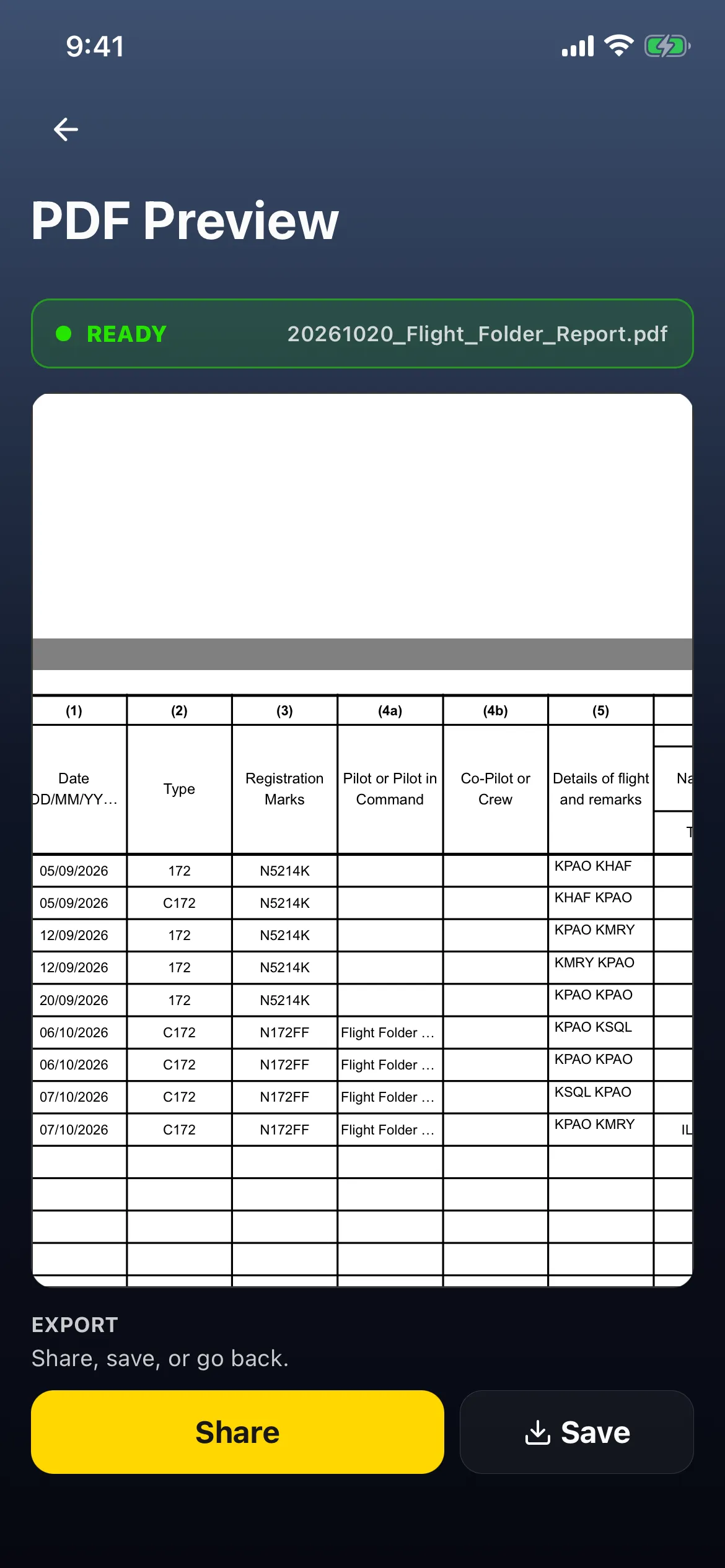
- The name in (4a) is the flight’s P1 crew member. In the example, the October flights print the account’s display name, Flight Folder Logbook, cut short to fit. The September flights have no P1 crew, so the box is blank.
- There’s no total-time column for each flight. The only total time on the page is at the foot (step 4).
3. Instrument Time: Nav Aids and Place
Section titled “3. Instrument Time: Nav Aids and Place”Slide across. Instrument Time has four columns: (6) Nav Aids, (7) Place, (8) Actual Time and (9) FSTD Time. Then come Instructor (10) SE, (11) ME and (12) FSTD, and (13) FSTD.
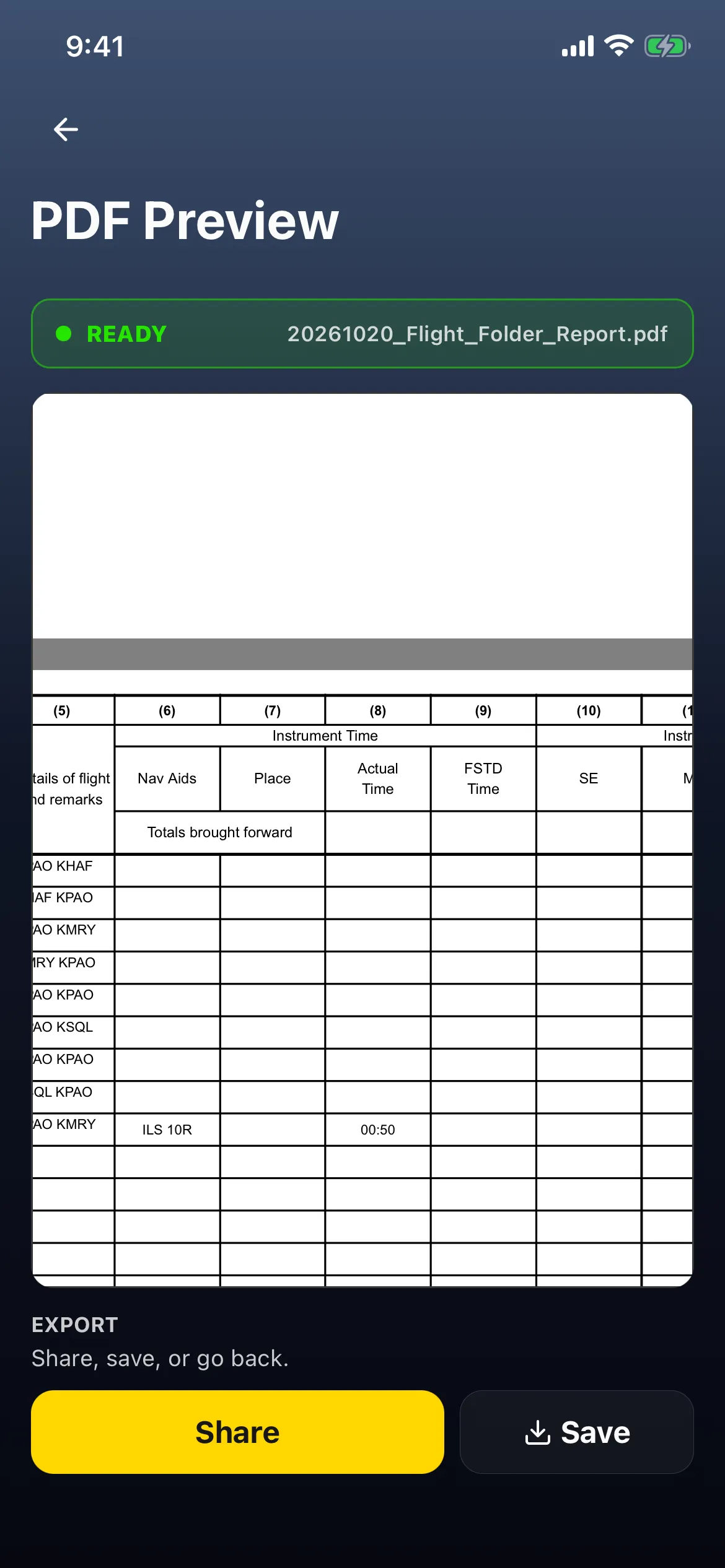
- Only the 7 October flight, KPAO → KMRY, has anything here: Nav Aids ILS 10R, Actual Time 00:50.
- Place is empty. It’s meant for the approach’s airport, but it prints empty on every flight, even for this ILS at Monterey. That’s an app bug.
- Nav Aids shows the flight’s first approach only. In the example, that flight also had an RNAV 28L, which isn’t shown.
4. The foot of the left page
Section titled “4. The foot of the left page”
- Total Flight Time 93:52 Hours: the same as the Dashboard’s Total time. It’s the 9 flights (8:52) plus the paper logbook (85:00).
- Totals 00:50 under Actual Time: the instrument time to date.
- The Totals brought forward row at the top has no box for total time, so the 85:00 itself isn’t printed on its own anywhere.
5. The right page: where each hour goes
Section titled “5. The right page: where each hour goes”Scroll down to the right page.
| Columns | Heading | In the example PDF |
|---|---|---|
| (14)–(17) | Single engine aircraft · Day · Dual / PIC / PICUS / Co-Pilot | PIC on eight rows: 00:35, 00:30, 01:05, 01:00, 01:10, 00:50, 00:40, 01:42 (= 07:32) |
| (18)–(21) | Single engine aircraft · Night · the same four | PIC 01:20: the 6 October flight at 19:40 from Palo Alto |
| (22)–(29) | Multi engine aircraft · Day / Night · the same four | Empty |
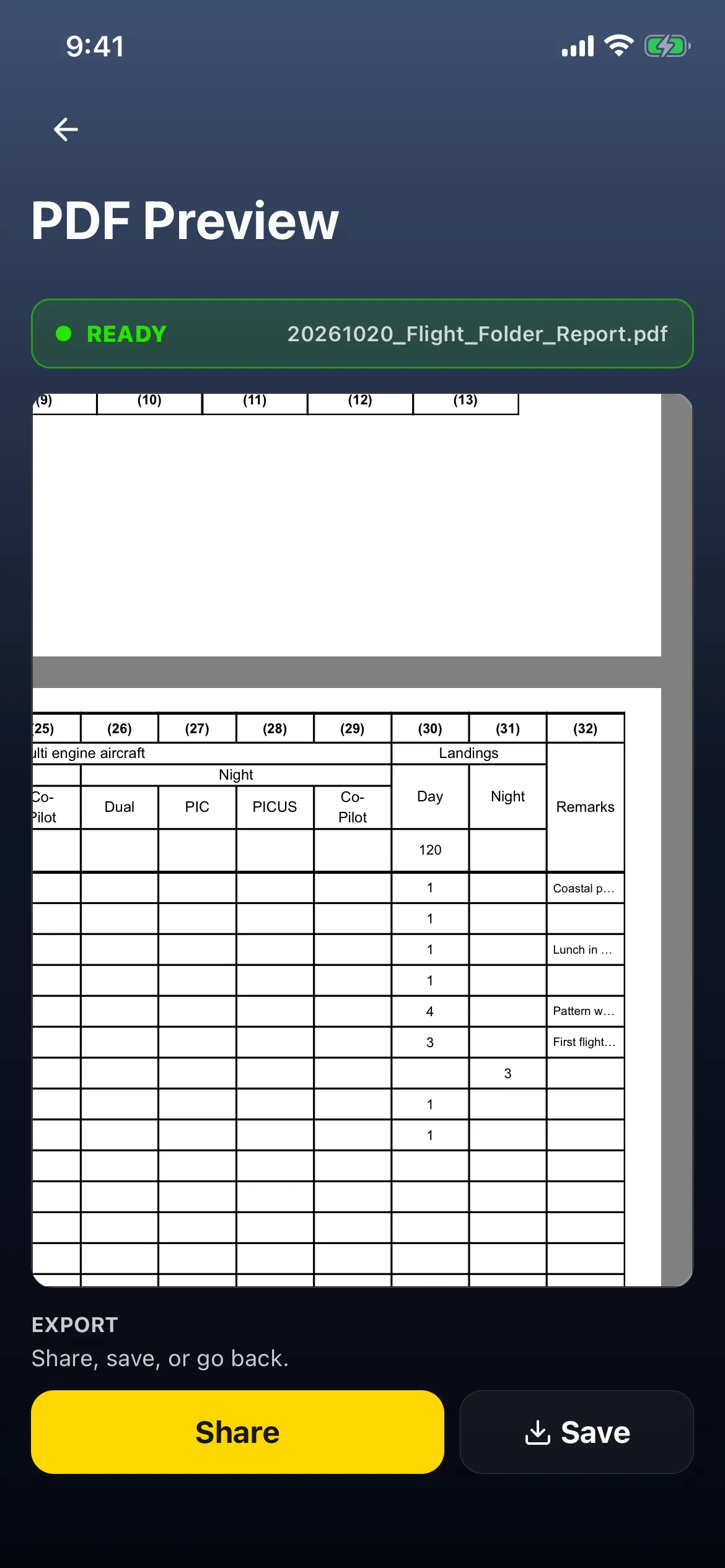
| (30)–(31) | Landings · Day / Night | Day 1, 1, 1, 1, 4, 3, –, 1, 1 (13); night 3 on the night flight |
| (32) | Remarks | Cut short to fit: Coastal p…, Lunch in …, Pattern w…, First flight… |
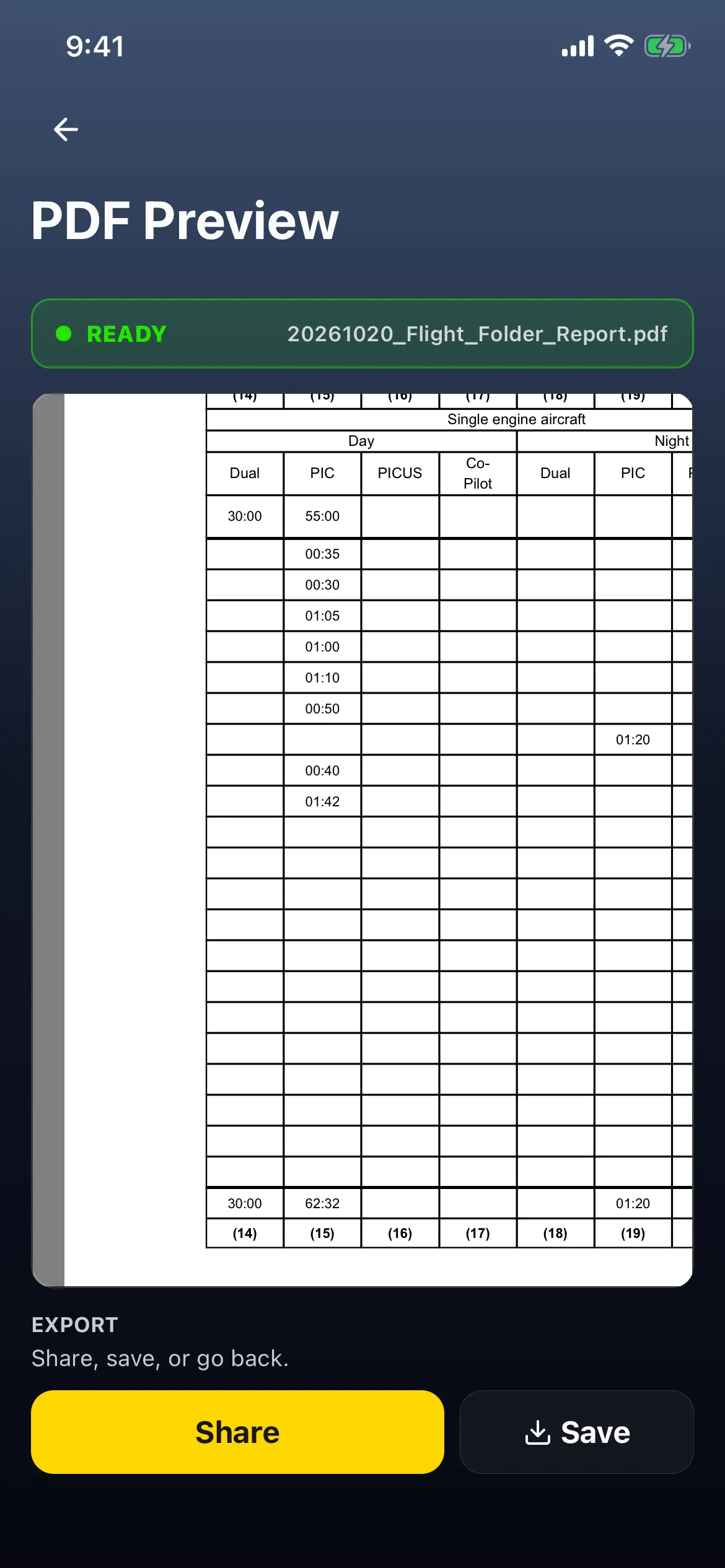
- The top row is the Totals brought forward: your paper logbook. In the example it reads Day Dual 30:00, Day PIC 55:00 and 120 day landings. It was entered with no engine split and no night figure, so it counts as single-engine day.
- In the example the C172s have one engine, so every flight is single engine.
6. The totals
Section titled “6. The totals”At the foot of the right page, one row adds up each column, brought-forward row included:
| Day Dual (14) | Day PIC (15) | Night PIC (19) | Day landings (30) | Night landings (31) |
|---|---|---|---|---|
| 30:00 | 62:32 | 01:20 | 133 | 3 |
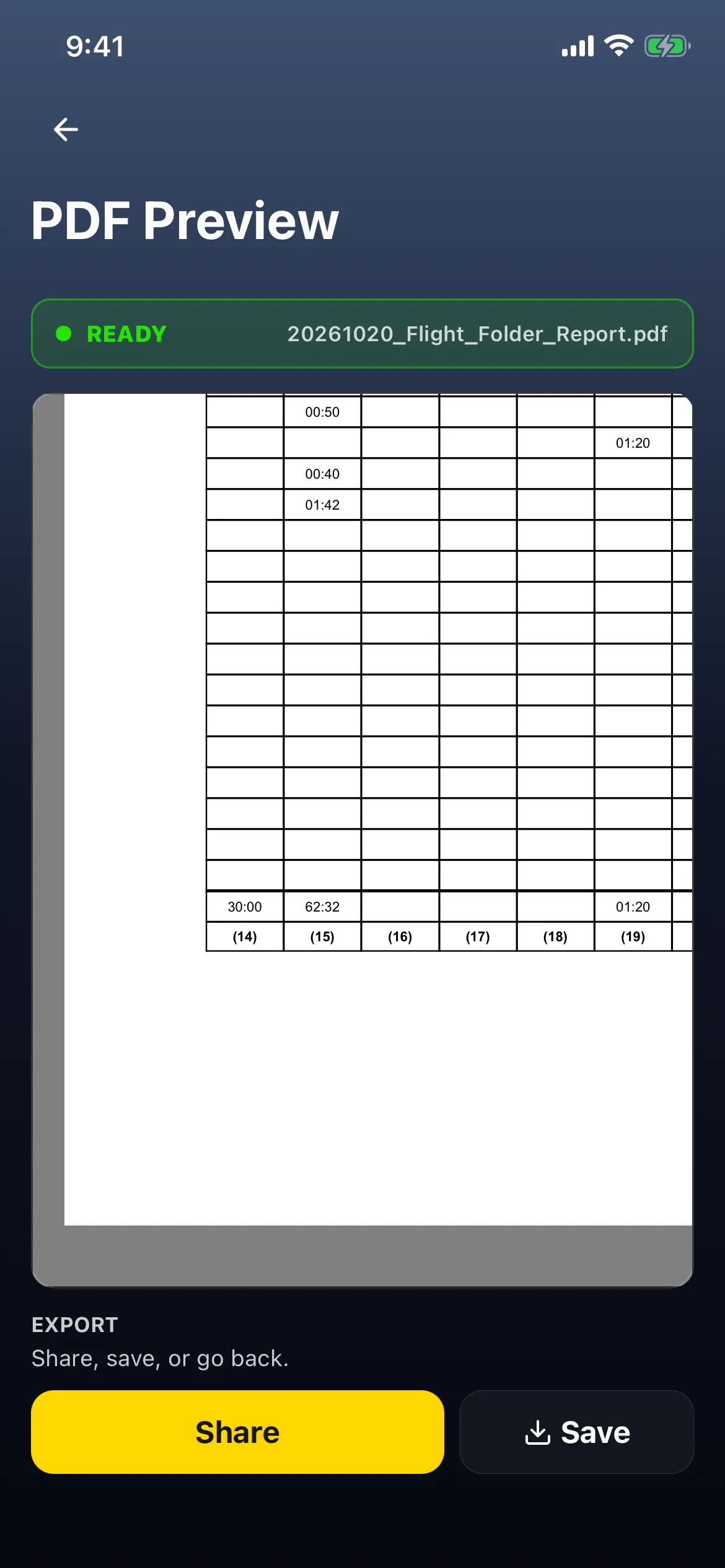
Day PIC 62:32 is 55:00 brought forward plus 07:32 from the flights. It’s day only: add Night PIC, 62:32 + 1:20 = 63:52, to get the Dashboard’s PIC Time. 133 day landings are 120 brought forward plus 13.

7. Put it back
Section titled “7. Put it back”- Tap back (←) twice. Export’s REPORT list now shows HK CAD and South African CAA, with South African CAA in use (PREVIEW South African CAA · All time).
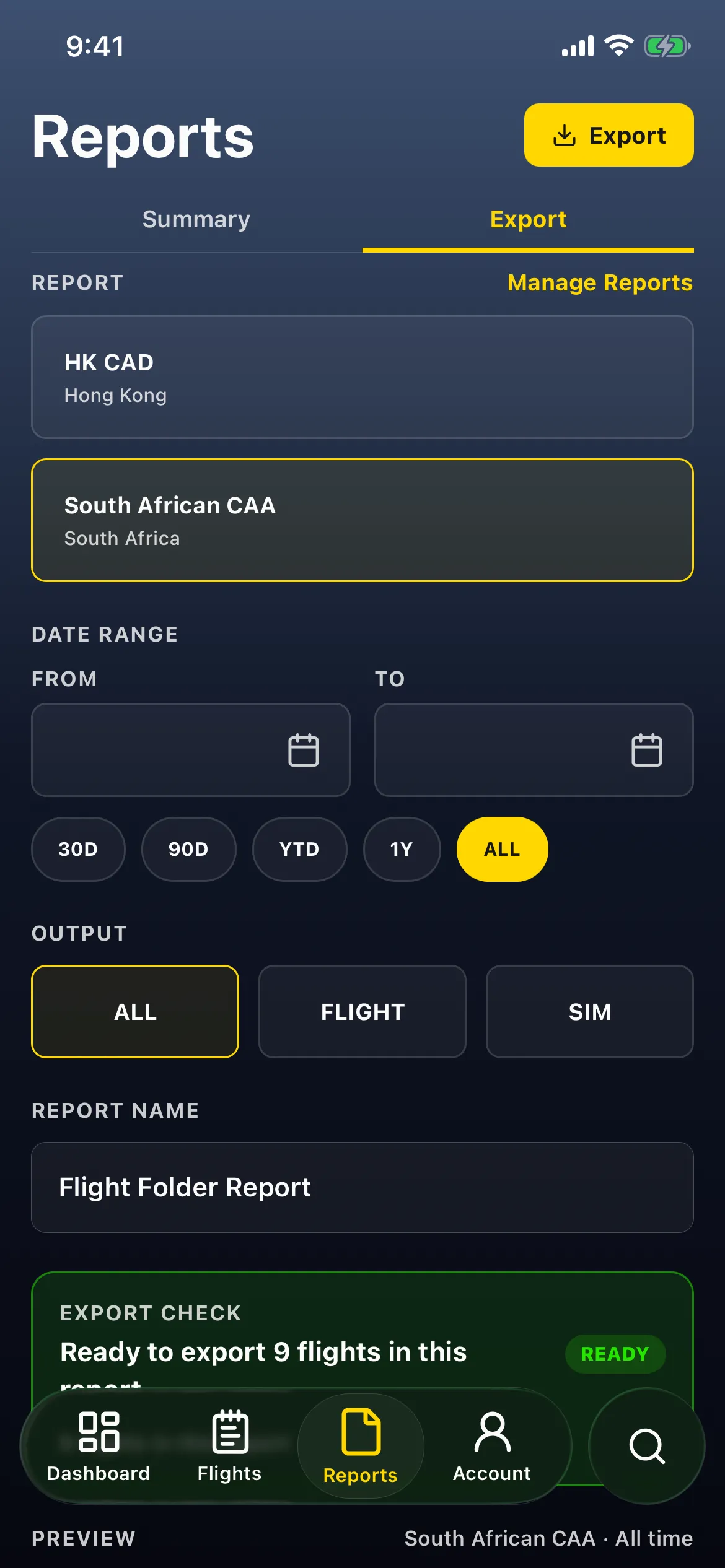
- Tap HK CAD (or the report you use). PREVIEW reads HK CAD · All time.
- Tap Manage Reports, scroll to SOUTH AFRICA and tap the South African CAA row (it reads Pinned on Reports). It changes to Hidden from Reports.

- Tap back. Export lists only HK CAD again, Ready to export 9 flights in this report, PREVIEW HK CAD · All time.
Good to know
Section titled “Good to know”- Preview pins it. Previewing a format pins it to Export and makes it the report in use, and both are saved to your account. Tap your usual report first, then hide the one you previewed by tapping its row under SOUTH AFRICA.
- The text is 7 pt on a fixed layout. On a phone, pinch in and slide around.
- Dates print day/month/year, matching the header (DD/MM/YYYY). (Transport Canada’s don’t: see Your Transport Canada logbook: where each hour goes.)
- Place stays empty, even if you logged the airport of an approach. Write it on the printout if you need it.
- One flight, two type names? Type prints the name saved with each flight, so the same aircraft can show 172 on some rows and C172 on others. Check the column before you print.
- The foot is the total to date. It’s at the foot of every left and right page, includes your paper logbook, and there’s no separate page total.
- Your paper logbook comes in as Totals brought forward. Carry it over in the South African CAA format to fill each single-/multi-engine, role and day/night box yourself. A carry-over made in another format with no engine split or night figure lands as single-engine day. See Carry over your old logbook.
- No signature line. The South African CAA pages have no certification or signature box. See Sign your logbook PDF for the formats that do.
- Don’t tap Custom on South African CAA: it opens Custom report unavailable and leaves an empty custom entry behind. See Customize your report columns.
- Nothing is shared or saved until you tap Share or Save.