
Is it cross-country? Watch the 50 nm rule fill XC
Why didn’t a flight count as cross-country? With AUTO on, FF Logbook fills XC by itself from the total, but only when the route’s distance reaches your role profile’s Minimum distance. That’s 50 nm on the General Aviation profile. Here’s where the rule lives, and two flights on either side of it.
1. Where the rule lives
Section titled “1. Where the rule lives”- Tap Log Flight, then New Flight. On the Role step, tap Edit Role Fields for General Aviation. The profile’s Logbook Fields open (for example 29 OF 189 SHOWN).
- Tap Flight Times (for example 6 / 28, shown as 6 OF 28 SHOWN).
- Find Cross-Country (XC). When it fills itself, AUTO is lit (gold) and its switch is on. The row below reads Minimum distance 50 nm.

A route counts when its distance is at least the minimum, so exactly 50 nm counts. XC then gets the flight’s total time.
If you only looked, go back: nothing needs discarding. You can also reach this screen from Account → Pilot Role → the settings button on the role card → Role Profile → Logbook Fields → Flight Times. See Role profile and auto-fill explained.
2. A short hop: no cross-country
Section titled “2. A short hop: no cross-country”- Back on the Role step, tap Next · Flight. Tap Pick a date and choose the day (for example Sunday 18 October 2026).
- Departure KPAO (Palo Alto Airport), Arrival KHAF (Half Moon Bay Airport). After the arrival pick, the cursor jumps to Registration, which offered N172FF (C172 · 172) as a favourite. Pick it.
- Next · Total Flight. Type OUT 15:00, OFF 15:08, ON 16:35, IN 16:42. Block reads 1:42 (OUT→IN) and Air 1:27 (OFF→ON).
- Open Times. It reads, for example, 1 OF 6 FILLED: P1 has the 1:42 from the total. XC waits in the row below as a dashed + XC chip (Fill XC with 1:42 from total), next to + P2 and + DUAL RCVD. Cross-country is empty.

- Open Proc. DISTANCE reads 19 NM. That’s under 50, so XC stays empty.

3. Over the line: XC fills itself
Section titled “3. Over the line: XC fills itself”- Go back to Flight. Clear Arrival, type KMRY and pick KMRY / MRY (Monterey Regional Airport). Registration still reads N172FF; tap Done to close the keyboard.
- Open Proc. The distance has been worked out again: 54 NM.

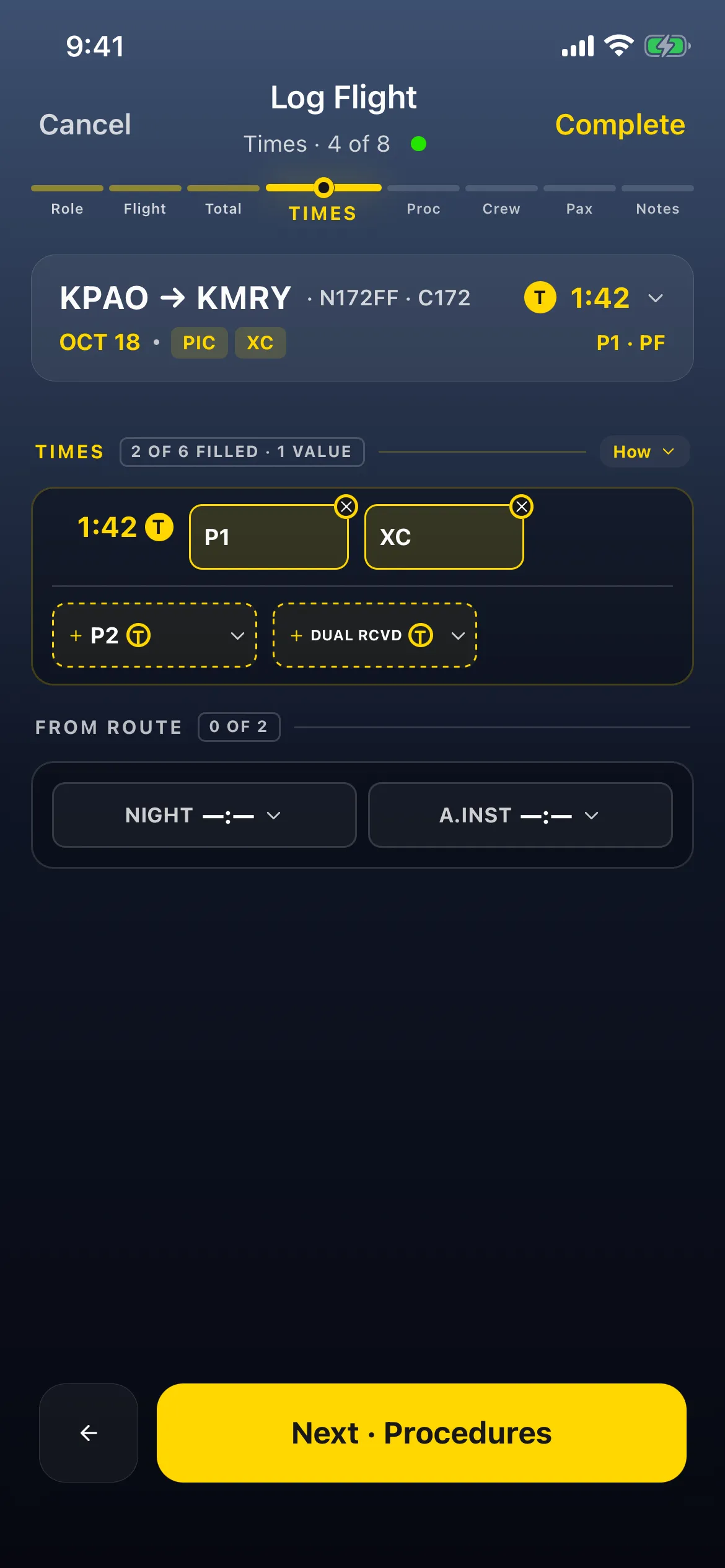
- Open Times. It now reads, for example, 2 OF 6 FILLED: XC now sits next to P1 in the 1:42 T row, so it follows the total. The flight’s header gains an XC tag beside PIC.
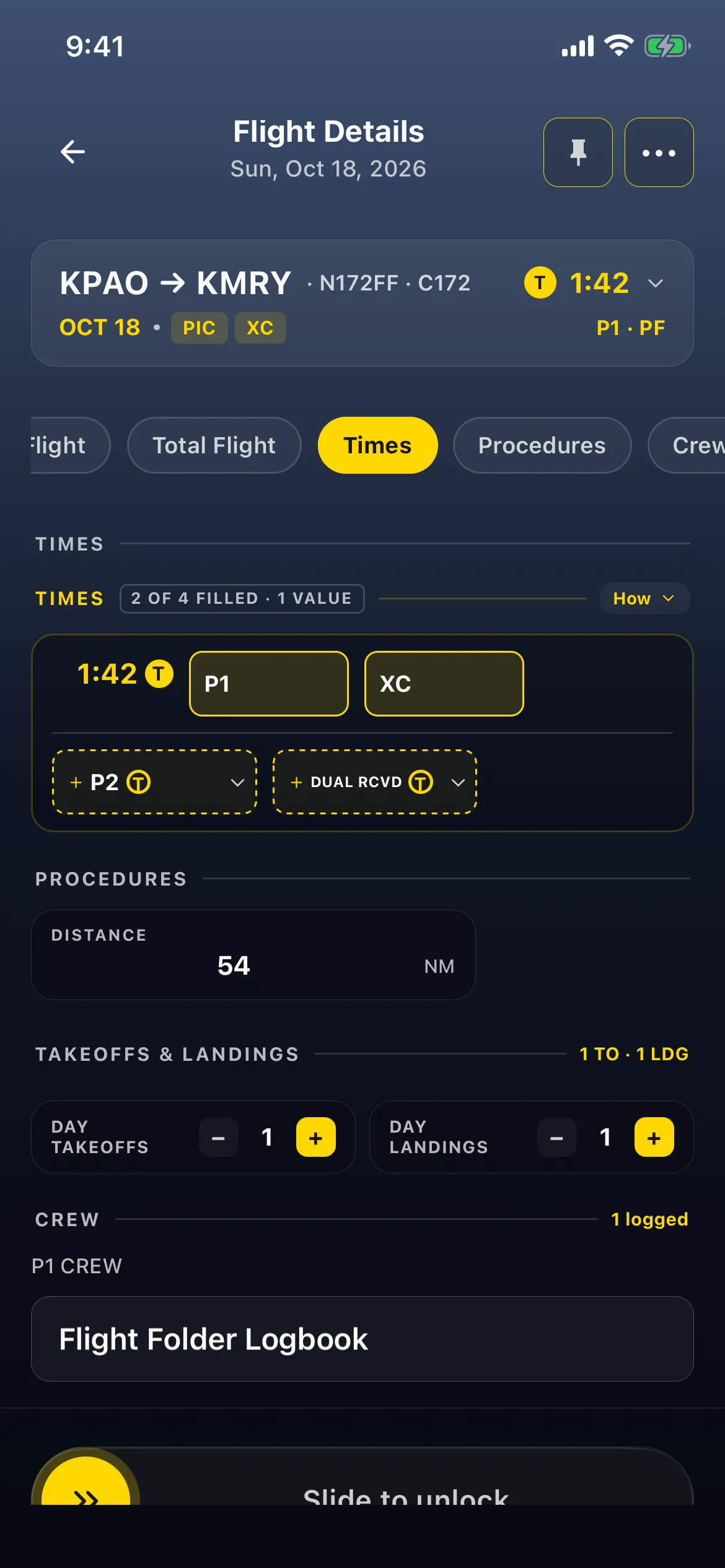
- Tap Complete. Flight Details opens on Sun, Oct 18, 2026: KPAO → KMRY · N172FF · C172 · 1:42, tagged PIC and XC. Tap the Times jump chip: P1 and XC at 1:42, and under Procedures DISTANCE 54 NM, 1 TO · 1 LDG.
Good to know
Section titled “Good to know”- At least, not more than. The app’s test is the distance ≥ the minimum, so a flight of exactly 50 nm gets XC.
- Every leg is added. With stops, the distance is the sum of departure → stops → arrival, and that’s what’s compared with the minimum. So a local flight via a stop can pass 50 nm without ever landing 50 nm away. See Log stops, Tach time and operation type. The flight map measures differently, in a straight line per flight: What the flight map counts.
- The app’s rule isn’t your regulator’s. Many rules (FAA 14 CFR 61.1, for most ratings) mean a landing more than 50 nm in a straight line from where you started. Set the minimum your rules use, and check XC against them.
- Set your own minimum in the Minimum distance box, then Save. It takes 1 to 9999, and an empty box falls back to 50. If you’re only looking, don’t tap the box: leaving it can count as a change, and Back then asks you to discard it.
- Under the minimum, fill it yourself. Tap + XC on Times to fill it from the total for this flight only. See Change an auto-filled time.
- A route change recalculates Distance and overwrites a distance you typed.
- Change the route before you open Times, or check XC afterwards. Changing a route from short to long fills XC. The other way round, the code suggests that XC already filled on Times stays filled after a route change brings the distance under the minimum, and Complete saves it. If you shorten a route, look at Times before you save.
- Only Cross-Country (XC) shows the minimum, and only while its AUTO is on and the field is shown.