
How far to your ATP? Change the 1,000-hour goal to 1,500
Working toward a bigger total, such as the hours an airline or your licence asks for? You don’t need a new goal: raise the target on the one you have. A 1,000 Total Hours goal becomes a 1,500-hour goal in the same slot. For a commercial total, type 250 instead; use whatever total your licence asks for.
Don’t have the goal yet? On Widgets, tap +, scroll to GOALS and pick 1,000 Total Hours (Track progress toward 1,000 hours of total flight time.), then the checkmark.
1. Open the goal’s editor
Section titled “1. Open the goal’s editor”- On the Dashboard, the card reads 1,000 TOTAL HOURS, your total and of 1,000 HRS with a percentage. Tap the sliders button at the top right.
- Widgets opens. Tap the 1,000 Total Hours row on its name, not on the Show on Dashboard / Show in Reports switches.
- Edit Widget opens on the Goal tab: Goal type Hours, Target 1000 h, Metric field Total Time, Status thresholds Off — plain value, Time window All time, Filters All entries, Show on… iPhone Dashboard, Name 1,000 Total Hours.
2. Raise the target
Section titled “2. Raise the target”- Tap Target. The Target sheet shows TARGET HOURS 1000 and the hint The widget fills as logged hours approach this number.
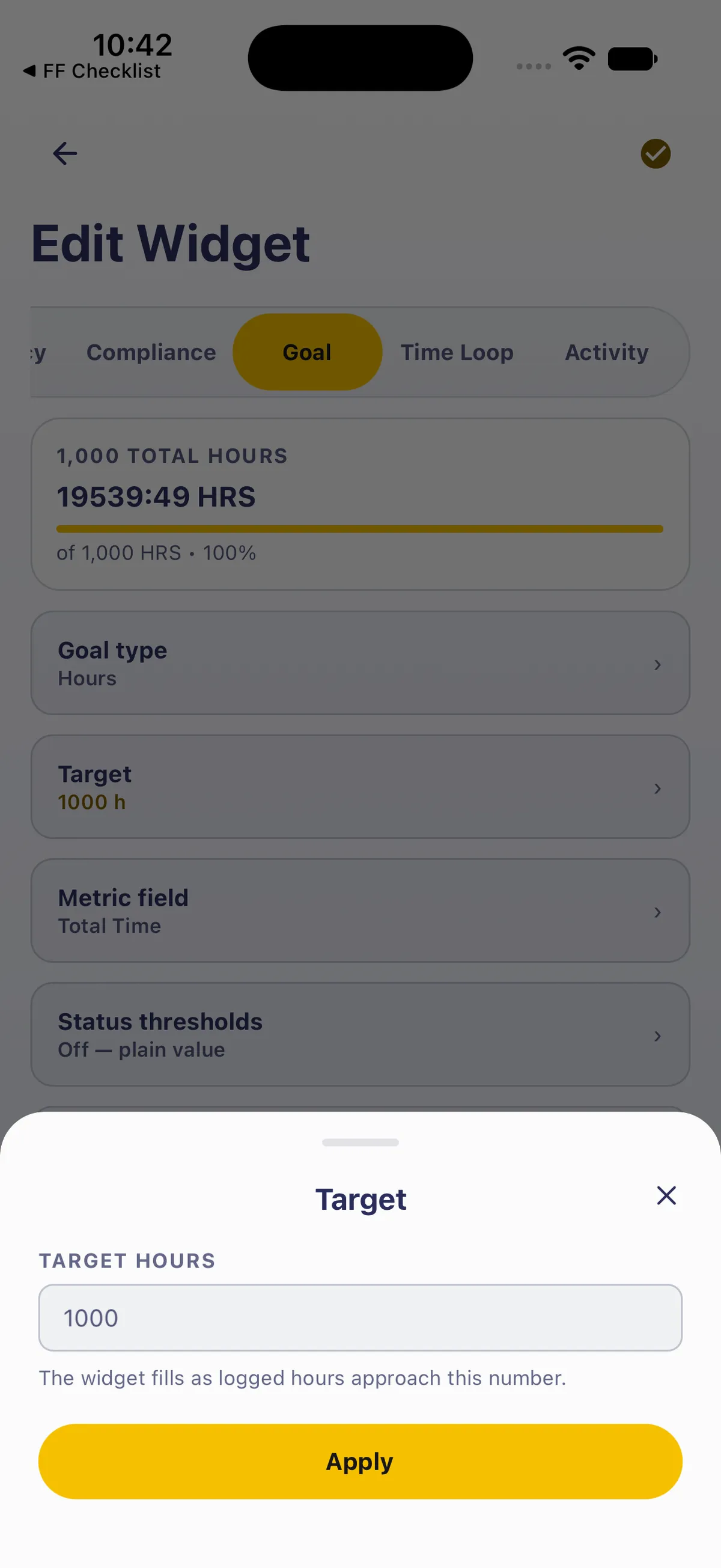
- Tap the box, clear it and type 1500. Tap Done above the keyboard if it’s in the way.
- Tap Apply. Target reads 1500 h, and the preview reads of 1,500 HRS with the new percentage.

3. Rename it to match, and save
Section titled “3. Rename it to match, and save”- The preview still says 1,000 TOTAL HOURS. Scroll down and tap Name. The sheet shows the current name, 1,000 Total Hours, and the hint Leave this blank to keep the automatic name shown above.
- Change it to 1,500 Total Hours and tap Apply. The preview’s label changes to 1,500 TOTAL HOURS.

- Tap the checkmark at the top right to save. Widgets lists 1,500 Total Hours in the same place.
- Go back (←). The Dashboard card reads 1,500 TOTAL HOURS and of 1,500 HRS.

What counts
Section titled “What counts”- Your carry-over counts. Goals include the prior experience you carried over from a paper logbook, so the card can read more than the flights in your list add up to. That’s what you want for a licence total. See Carry over your old logbook.
- The hint says logged hours, but it means everything the goal counts, carry-over included.
- Only the target changes. The Metric field (Total Time), Time window (All time) and Filters (All entries) stay as they were. To count only PIC, or only hours in one aircraft, change those rows too (see Count exactly the hours you need).
- The percentage is rounded to a whole number, and stops at 100% once you pass the target.
Good to know
Section titled “Good to know”- Tapping the card opens Flights, not the editor. Flights opens filtered to the goal (a Widget: 1,500 Total Hours chip with Report and Clear); see See the flights behind a number. To edit the goal, go through the sliders button and Widgets.
- Changed your mind? The back arrow at the top left of Edit Widget leaves the editor without saving.
- Clear the name and it goes automatic. The Name sheet’s hint says a blank name keeps the automatic name. Type a name if you want it to say what it counts.
- Editing doesn’t move it. The goal keeps its Dashboard slot and its place in Widgets after you save.
- To put it back: the same path, Target 1000, Name 1,000 Total Hours, the checkmark.
On iPad
Section titled “On iPad”On iPad, Edit widgets at the top right opens Widgets as a centred sheet, with Tablet layout first.


Related: Set goals and chart your flying · Keep a monthly flying streak with a Streak goal · What share of your flying is at night? A Ratio goal · Count exactly the hours you need · Customize your Dashboard · Put a flight-time chart on your Dashboard · Carry over your old logbook · See the flights behind a number