
Print a one-page Totals Summary
Airline applications and interviews often ask for your totals on one page. Totals Summary is a built-in report that does exactly that.
1. Preview it
Section titled “1. Preview it”- Reports → Export → Manage Reports. Report Formats lists every format (Pin · Preview · Customize). Pinned on Reports at the top are the ones you see on Export.
- Scroll down to SUMMARY → Totals Summary (Hidden from Reports until you use it). Tap Preview.
- PDF Preview shows the totals page. Totals Summary has no cover page. The page lists ENTRIES, FLIGHTS and SIMULATORS, then Flight Time, Roles & Instruction, Instrument & Simulator and Operations. A box says when prior experience (paper logbook totals) is included (for example Paper logbook totals · LOGGED TIME 85:00). The PDF is named after the report name, Flight Folder Logbook, with the date in front (20261027_Flight_Folder_Logbook.pdf).

Previewing pins Totals Summary to Reports and makes it the report in use on Export.
2. Choose the dates
Section titled “2. Choose the dates”On Export, with Totals Summary selected:
- Pick a DATE RANGE: 30D, 90D, YTD, 12M, ALL, or FROM and TO dates.
- Tap Export at the top. The totals page footer shows the range (Range … to …). With Include prior time in totals on (the default), Totals Summary still adds every earlier flight and any carried-over paper time dated before the range, so it shows your totals up to the end date. Turn it off under advanced PDF settings for totals of just that range. The footer’s range can show the span of your flights rather than the period you chose, so check the totals page before you send it.
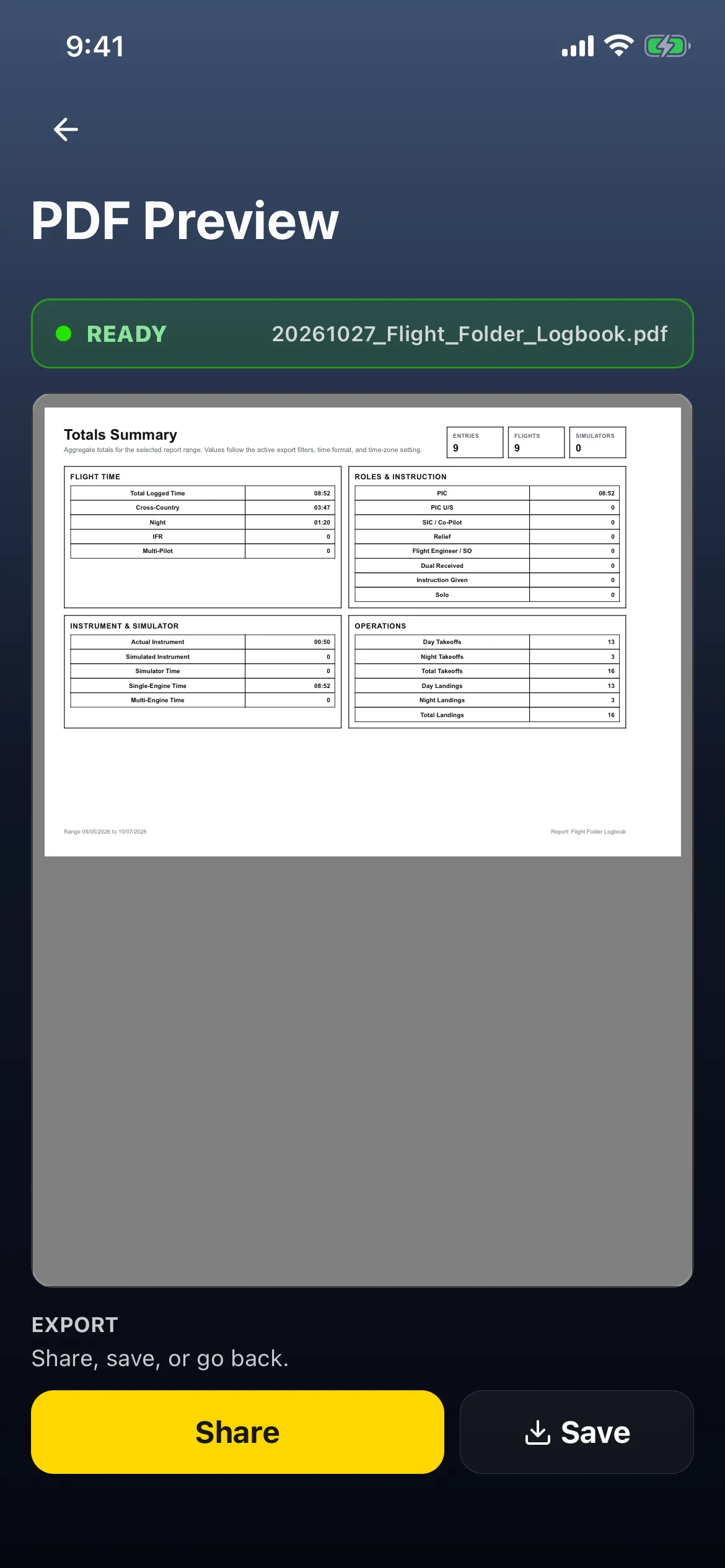 3. **Share** or **Save** it from PDF Preview.
Output (ALL / FLIGHT / SIM) and the Include prior time in totals option under advanced PDF settings also apply. Values follow your time format and time-zone settings.
3. Put things back
Section titled “3. Put things back”- Switch back: on Export, tap your usual logbook (for example HK CAD) and your usual dates (ALL).
- Hide it again: after switching back, open Manage Reports and tap the Totals Summary row: it reads Hidden from Reports again, and only your usual logbook is Pinned on Reports. Switch back first: while Totals Summary is still the report in use, a tap on its row (or the minus) only moves it to the top.
The report in use is saved to your account. The sideways logbook table on Flights only offers pinned logbook formats, so Totals Summary never appears there, and opening it while Totals Summary is in use switches Export back to your first pinned logbook.
Good to know
Section titled “Good to know”- Don’t tap Custom on Totals Summary: it can’t be customised and leaves an unusable entry.
- Totals depend on the dates, the output filter and whether prior time is included, so they may not match a Dashboard tile exactly.
- Preview ignores a search, so for one aircraft’s totals, search on Export and tap Export at the top instead: see One aircraft’s hours on one page, without your paper logbook.